Configuring Wireless

  • Subscribe to our RSS feed.
  • Twitter
  • StumbleUpon
  • Reddit
  • Facebook
  • Digg

Friday, June 3, 2011

SSRS: Accessing Report Builder 3

Posted on 1:12 PM by Unknown
This blog post covers accessing and installing the "Report Builder" tool that comes with Microsoft SQL Server Reporting Services (SSRS) 2008R2.


All access to Report Builder is obtained via Internet Explorer. In order to get access to the system you will require specific permission – without it the instructions below will not work (the “Report Builder” button will not be visible).

To start Open “Internet Explorer” and go to the following URL:

https:///Reports/

Where is the name of the SQL Server on which Reporting Services has been installed.

After a few seconds pause Internet Explorer will display something similar to:


The available options on your screen will depend on the permissions the administrator of the system has defined for you.

This is the "main" page for SQL Server Reporting Services. This version is slightly updated for the latest 2008R2 version of SQL Server.

Looking at the "buttons" on the menu bar click on the one labelled "Report Builder":


This will bring up a dialog:


If this is the first time you've clicked "Report Builder" then the software will download and install on your machine. The installed software is user-specific so no-one else using your computer will have access to it and it does not require elevated permissions to install (i.e. it will not trigger UAC on Vista or Windows 7).

It's about 70MB so the download could take a few minutes. Once it's completed you will see a splash screen as Report Builder starts up:


This splash screen is displayed while the application starts, as soon as the application is setup you will see a selection screen:


Select the type of report you want to proceed (i.e. Table or Matrix Wizard).
Read More
Posted in report builder 3, sql server reporting services, ssrs | No comments

SSRS: Adding Parameters in Query Designer (When Using a DataModel as a Data Source)

Posted on 1:05 PM by Unknown
This blog post gives an example of how to add a parameter to a report using Microsoft SQL Server 2008R2 and the Report Builder 3 tool.


After running Report Builder and opening your report you will see something like this;


Expand the "Datasets" node in the treeview on the left;


If you right-click the active Dataset (DataSet1 - highlighted above) and then select "Dataset Properties";


This screen is showing you a lot of technical details about the Query you have put together. Click "Query Designer ..." to get to something more meaningful. To use the "Dataset Properties" screen you will need  training.

The "Query Designer" screen appears and, if you used the wizard to generate your reports,  you'll remember it from them:


Click on the "Filter" icon in the bar at the top. This will display the "Filter Data" screen:


Scroll down the Field list (bottom left) until you find the field you're interested in adding as a parameter. For the sake of this example I'm going to add the "INVOICE DATE" field. When you find the field you're after you can either double-click it or drag/drop it into the "xxxx INVOICESs with:" area):


If you hover over the "equals" (next to INVOICE DATE) it will turn into a click-able link. Click it:


Select "On or After" in the list and then hover over the "INVOICE DATE" (which will also turn into a click-able link) and right-click it:


Select "Prompt" (this means the user will get a prompt).

Click "OK" to save the changes and close the dialog.

We are now back to the "Query Designer" main page and it looks like nothing has changed. Click "Run" button:


A dialog will now appear asking for a value for the "INVOICE DATE" parameter.


Click "OK" and the report will run and give you values for the specified date.

Click "OK" to save the changes to the Query and then click "OK" to save changes to the Dataset and return to the main editor.

Click "Run" at the top left:


This will switch to the report run viewer and, as there is a report, will prompt you at the top of the screen for a value:


Enter "20-APR-2010" and either hit return or click "View Report". The report will now run with the specified parameter.

Read More
Posted in data model, data source, sql server reporting services, ssrs | No comments

SSRS: Formatting a Parameter as Date/Time

Posted on 12:56 PM by Unknown
This Knol covers how to convert an existing text-based parameter in Microsoft SQL Server Reporting Services to a Date/Time providing the users with a Date/Time picker to select a value rather than forcing them to enter text (i.e. 10-JAN-2010) without making a typo.


Assuming you have your report already open in Report Designer and you've just run it. The report we're going to deal with has a single parameter "INVOICE_DATE". Click "Design" at the top left:


Expand the Parameters item in the "Report Data" treeview (on the left):


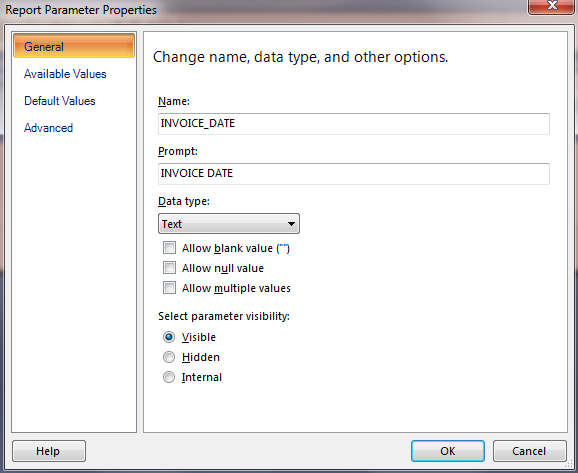
Highlight "INVOICE_DATE", right-click and then select "Parameter Properties". The "Report Parameter Properties" dialog will now appear:Highlight "INVOICE_DATE", right-click and then select "Parameter Properties". The "Report Parameter Properties" dialog will now appear:


On the General tab change the Prompt to "Invoice Date: " and the Data type to "Date":On the General tab change the Prompt to "Invoice Date: " and the Data type to "Date/Time":


Click "OK".

Click "Run" the top left:


You can not see that instead of having a simple text-edit you've got a little button to click which will bring up the date picker.
Read More
Posted in sql server reporting services, ssrs | No comments

SSRS: Specifying a Default Value for a Date/Time Parameter

Posted on 12:49 PM by Unknown
This blog post covers how to specify a default parameter value for a Date/Time Parameter in a report written using Microsoft SQL Server Reporting Services (SSRS). You can easily modify this to specify default values for other types of parameter.


Assuming you have your report already open in Report Designer and you've just run it. The report we're going to deal with has a single parameter "INVOICE_DATE". Click "Design" at the top left:


Expand the Parameters item in the "Report Data" treeview (on the left):


Highlight "INVOICE_DATE", right-click and then select "Parameter Properties". The "Report Parameter Properties" dialog will now appear:Highlight "INVOICE_DATE", right-click and then select "Parameter Properties". The "Report Parameter Properties" dialog will now appear:


We're interested in changing the "Default Value" so select that tab:


Select the "Specify values" radio group:


Click "Add":


Then click the function button (highlighted) on the right of the new line:


Enter the expression:

=DateAdd("m", -1, DateSerial(Year(Now()), Month(Now()), 1))

(You're probably wondering where I got this from - type "reporting services first day of the month" into Google - it's the first result).

This expression will give you the first day of the PREVIOUS month. Click "OK". Click "OK". Click "OK" (you should be back to the main designer now with no additional dialogs open).

Click "Run", your report Parameter will now have a default value (and if it's the only parameter your report will now run automatically).
Read More
Posted in DateAdd(), DateSerial(), Month(), Now(), sql server reporting services, ssrs, Year() | No comments

Thursday, June 2, 2011

Noetix: Identifying Un-used Columns For Removal

Posted on 1:27 PM by Unknown
This blog post covers a description of an application (source code provided) that identifies columns which are not required (i.e. all values of the column in the view are the same) and generates a script that somone who has completed the NoetixViews Customization Certification course can include in the Generation Scripts.


The first thing to note is how this works; it opens every view doing a MIN/MAX on every column. It has been tested on a 16GB database and works fine - of course the main requirement of an application like this is to have enough TEMP tablespace in order to work. This is the reason the columns are dealt with individually rather than just opening each view and doing a MIN/MAX on every column in the view in a single hit - this was blowing out the 5GB of TEMP tablespace we had available on the test system.

The application is a simple console application:


All it does is process the views in the database using the SQL:

SELECT DISTINCT UPPER(v.VIEW_NAME) VIEWNAME
  FROM n_views v
 WHERE EXISTS
 (SELECT 'x'
          FROM all_views av
         WHERE av.OWNER = USER
           AND av.VIEW_NAME = UPPER(v.VIEW_NAME))
   AND NVL(v.OMIT_FLAG, 'N') = 'N'
   AND NVL(v.Special_Process_Code, 'X') NOT IN ('LOV', 'BASEVIEW')
   AND (UPPER(v.VIEW_NAME) = '%VIEWNAME%' OR '%VIEWNAME%' = 'ALL')
ORDER BY UPPER(v.VIEW_NAME)

This gives a list of all the views in the database. The %VIEWNAME% is replaced with the first argument on the command line (optional). If nothing is specified then it is replaced with ALL.

Views which are omitted by default are automatically excluded as are all views which are of type LOV (list of values) or BASEVIEW.

Once the list of views has been obtained then the list of columns in each view is retrieved using the SQL:

 SELECT COLUMN_NAME, DATA_TYPE, COLUMN_ID
  FROM ALL_TAB_COLUMNS ATC
 WHERE ATC.OWNER = USER
   AND ATC.TABLE_NAME = '%VIEWNAME%'
   AND ATC.COLUMN_NAME NOT LIKE 'A$%'
   AND ATC.COLUMN_NAME NOT LIKE 'Z$%'
   AND ATC.DATA_TYPE NOT IN ('ROWID', 'LONG')
   AND INSTR(ATC.COLUMN_NAME, '$') = 0

The list of  columns excludes the A$ and Z$ columns that are managed by Noetix and columns which contain a "$" symbol (flexfields) as if you want to remove these you can disable them in the e-Business Suite itself.

Once the appliction has the list of columns it looks through them building the SQL:

SELECT 1 AS IGNORE
   ,TO_CHAR(MIN()) AS MIN
   ,TO_CHAR(MAX()) AS MAX
FROM

The MIN and MAX values are then compared, if they are the same when an SQL file is created for the suppression of the field (for future reference the MIN and MAX values returned are stored in the file).

As you can imagine when accessing the GL views this query can take quite a while - for our 16GB database processing all the views in our relatively simple configuration will take about a week (running multiple processes has gotten this down to 2-3 days).

This isn't quick - but it is effective - we are removing around 3,000 columns from the views. That's 3,000 less columns in the help and for our end users to "accidentally" pick the wrong one from!

Source Code: here (Visual Studio 2010, 20kb Zip Archive)
Build Environment: VS2010 + Oracle Client
Read More
Posted in All_Tab_Columns, All_Views, N_Views, noetix, noetix views | No comments

Monday, May 9, 2011

SSRS: Function ExistsInArray (Custom Report Builder Code)

Posted on 2:52 AM by Unknown
A simple function for embedding in SSRS Reports that allows you to check and see if an item exists in a array of items (in either a case sensitive or insensitive way).


Here is the function;

Function ExistsInArray(ByVal SearchTerm As String, ByVal MultiValueParam As Parameter, optional ByVal CaseInsensitive as Boolean = False) As Boolean
  For i As Integer = 0 To MultiValueParam.Count - 1
    If CaseInsensitive = True Then
     If CStr(LCase(MultiValueParam.Value(i))) = LCase(SearchTerm) Then Return True
      Else
        If CStr(MultiValueParam.Value(i)) = SearchTerm Then Return True
      End If
  Next
  Return False
End Function

You pass in the SearchTerm as a string and then the multi-value parameter you wish to search through. Optionally you can make the search case insensitive by specifying True for the third parameter. The function loops through the items and when it finds one that matches it returns True, otherwise if it finds nothing it returns False.
Read More
Posted in sql server reporting services, ssrs | No comments

Oracle PL/SQL: Creating A Database Link

Posted on 2:49 AM by Unknown
This Knol is a quick developers guide to creating a link between two Oracle databases using TNS Information but not editing the TNSNames.ora file on the server.


It is quite often the case that it is better to link two databases together and report from one of them rather than draw together information from multiple data sources - usually because the link can be re-used more easily and as you have a requirement to re-use it then it stands to reason other people might.

The problem is that DBA's don't generally like developers making changes to the TNS file on the server - and usually this TNS file will only include information for the current database - not all the databases in your company.

Fortunately the CREATE DATABASE LINK command lets you either name a specific TNS entry OR specify the details. To create a database link called DBLINK_TEST to another oracle database which *does not* exist in the TNS file you can use;

CREATE DATABASE LINK DBLINK_TEST
       CONNECT TO
       IDENTIFIED BY
       USING '
  (DESCRIPTION =
    (ADDRESS_LIST =
      (ADDRESS = 
      (PROTOCOL = TCP)
      (HOST = )
      (PORT = ))
           )
    (CONNECT_DATA = (sid = )))'

There is something to be said for not using the TNS file (especially in an Oracle EBS environment) as if you keep creating multiple clones of multiple systems the complexities of keeping the file up to date (and yes I know there are ways of automating it) might not be worth the time.
Read More
Posted in database link, Oracle, pl/sql, tnsnames.ora | No comments
Newer Posts Older Posts Home
Subscribe to: Posts (Atom)

Popular Posts

  • Oracle EBS: Initialising the APPS Environment in PL/SQL
    How to set your user, responsibility, etc in PL/SQL to work with APPS functions This blog post covers a fairly simple PL/SQL block that allo...
  • Problems Installing SharePoint 2010 on Windows 2008R2 Server (Configuration Failed- error)
    This Knol is a bit of a departure for me in that I'm not suggesting a solution to a particular problem more I'm just sharing with th...
  • Oracle R12 Lot Genealogy and Noetix
    If, like me, you work in a process manufacturing* company one of the key things you need to worry about is lot genealogy. Put simply this is...
  • Noetix: Working With Item Cost Summaries
    If you are, like us, users of Oracle Process Manufacturing then you'll have written a lot of reports which rely on Item Costings (both f...
  • Oracle PL/SQL: Copying Column Comments From One View To Another
    This blog post gives a piece of simple SQL that will allow you to automatically copy the comments from one database view to another. In the ...
  • SSRS: Adding Calculated Fields To Data Sets
    This blog post covers an example of how to add a simple calculated field to a Dataset in SQL Server Reporting Services using Report Builder ...
  • Oracle PL/SQL: Stripping Comments From PL/SQL Packages
    Now I've worked in several places with different coding policies. Some have said "comment your code where the meaning isn't cle...
  • Oracle EBS: Scripting the Creation of Event-based Oracle Alerts in Oracle e-Business Suite
    This was possibly one of the hardest things I've ever had to do in a long time. Not because it's technically challenging, but becaus...
  • Noetix Customisations (Per Month)
    We are in the final stages of completing our R11 to R12 migration project and I thought it would be useful (because someone asked) to talk a...
  • Oracle EBS: Linking GL Lines to AP Invoice Distributions in R12
    This blog post gives some guidance as to how to link a GL Journal line in Oracle R12 back to its associated AP Invoice Distribution. NOTE: T...

Categories

  • .net framework
  • #Error
  • 1080p
  • 1248ub
  • 2007
  • 2008R2
  • 32-bit
  • 4.1.1
  • 64-bit
  • 720p
  • accellion
  • active directory
  • ad
  • airplay
  • All_Col_Comments
  • All_MViews
  • All_Objects
  • All_Source
  • All_Tab_Columns
  • All_Tables
  • All_Views
  • ALR_Action_Outputs_Pkg
  • ALR_Action_Sets
  • ALR_Actions_Pkg
  • ALR_Alert_Installations_Pkg
  • ALR_Alert_Outputs_Pkg
  • ALR_Alerts_Pkg
  • ALR_DBTrigger
  • amazon wishlist
  • aod
  • AP
  • AP_Credit_Card_Trxns_All
  • AP_Invoices_All
  • AP_Payables
  • AP_Vendor_Sites_Pkg
  • AP_Vendors_Pkg
  • app-v
  • apple
  • apple mac
  • apple maps
  • apple tv
  • application virtualisation
  • AR_Receivables
  • arbury carnival
  • arbury community centre
  • arbury court
  • arbury court library
  • army of darkness
  • army of darkness defense
  • asp.net
  • audiobooks
  • bar hill cambridgeshire uk
  • bar hill library
  • bbc micro
  • bids
  • biztalk 2009
  • british telecom
  • business intelligence development studio
  • business objects
  • c sharp
  • cambridge central library
  • cambridge regional college
  • cambridge station
  • cambridgeshire county council
  • cambridgeshire library service
  • Cast()
  • ccc
  • CDate()
  • citi 1
  • city councillor
  • classic pc
  • cmdb
  • commodore 64
  • Concurren Requests
  • configuration items
  • configuration management database
  • conservative
  • Count()
  • county councillor
  • crc
  • D600
  • data model
  • data source
  • database link
  • dataset
  • DateAdd()
  • DateSerial()
  • dba_jobs
  • DBA_Objects
  • DBA_Tab_Columns
  • dbms_job
  • DBMS_LDAP
  • dbms_refresh
  • dbo.AllUserData
  • dbo.Catalog
  • dbo.ExecutionLogStorage
  • Dell
  • district councillor
  • doodle.com
  • dos box
  • driver
  • e-Business Suite
  • easypush
  • EBS
  • email
  • epetitions
  • excel
  • ExecutionLog2
  • fa
  • FA_Fixed_Assets
  • fixed assets
  • FND_Form_Functions
  • FND_Form_Functions_Pkg
  • FND_Global
  • FND_Menu_Entries
  • FND_Menu_Entries_Pkg
  • FND_Menus
  • FND_Profile_Option_Values
  • FND_Profile_Options
  • FND_Program
  • FND_Request
  • FND_Users
  • FOI
  • Format()
  • freedom of information
  • Functional Administrator
  • GL_Daily_Rates_V
  • GL_Item_Cst
  • GL_Je_Lines
  • GL_Ledger
  • Gmail
  • GMD_Product_Development
  • GME_Process_Execution
  • GMF_OPM_Financials
  • GMF_Period_Balances
  • GMF_SLA_Cost_Subledger
  • gmfg0_item_costs
  • GMI_Onhand_Inv_By_Lot
  • GMI_Process_Planning
  • google
  • google dns
  • google knol
  • google maps
  • green
  • gremlin
  • group policy
  • guided bus
  • high definition
  • home hub 3.0
  • home sharing
  • hr.net
  • i-Expenses
  • ibm
  • iccid
  • iExpenses
  • IIF
  • IIF()
  • iis
  • iis 6
  • imei
  • information
  • installation
  • InStr
  • InStrRev
  • Internet Expenses
  • INV_Forecasts
  • INV_Inventory
  • INV_Item_Onhand_By_lot
  • inv_lot_transactions
  • INV_Onhand_Quantities
  • INV_Period_Close_Details
  • INV_Quantity_Tree_Pub
  • inv_reservations
  • iOS
  • iOS 6
  • ip address
  • iPad
  • ipconfig
  • iPhone
  • iPod
  • iresign
  • itunes
  • java
  • Join()
  • june
  • key flex field
  • Key Flex Fields
  • kff
  • labour
  • Latitude
  • Left()
  • level 50
  • Liberal Democrat
  • libraries
  • Lookup()
  • lot genealogy
  • materialized views
  • maximo
  • microsoft
  • microsoft app-v
  • microsoft exchange
  • microsoft paint
  • migration
  • MobileIron
  • Month()
  • MRP_Forecast_Dates
  • MRP_Forecast_Designators
  • msi
  • Mtl_Material_Status_History
  • MTL_System_Items_B
  • mtl_system_items_interface
  • mustek
  • N_Buffer
  • N_F_KFF_Flex_Sources
  • N_GSeg_Pkg
  • N_Gseg_Utility_Pkg
  • N_KFF_Ctlg_Grp
  • N_KFF_GL_Acct
  • N_KFF_Item_Loc
  • N_KFF_Mtl_Cat
  • N_KFF_Sys_Item
  • N_KFF_Sys_Item_Pkg
  • N_Role_View_Templates
  • N_View_Column_Property_Templates
  • N_View_Column_Templates
  • N_View_Columns
  • N_View_Query_Templates
  • N_View_Table_Templates
  • N_View_Templates
  • N_View_Where_Templates
  • N_Views
  • native-mode
  • ncm
  • NLS_Language
  • NLS_Territory
  • noetix
  • noetix customization maintenance
  • noetix views
  • Now()
  • OE_Order_Entry
  • OIE
  • open interface
  • open source software
  • opensource-it.com
  • opm
  • ORA-01795
  • Oracle
  • Oracle Alerts
  • oracle client
  • Oracle General Ledger
  • Oracle Internet Expenses
  • Oracle Payables
  • Oracle Process Manufacturing
  • oracle sql developer
  • orchard park
  • os x
  • os x lion
  • Outlook
  • parish councillor
  • Payables
  • pc line
  • pcl-3000
  • pl/sql
  • PO_Distributions_All
  • PO_Purchasing
  • PO_Vendor_Sites
  • PO_Vendors
  • port forwarding
  • quick guide
  • Recyclebin
  • Release 11
  • Release 12
  • remote server administration tools
  • Replace()
  • report builder 3
  • router
  • run as a different user
  • sap
  • scom
  • services
  • sharepoint
  • sharepoint 2007
  • sharepoint 2010
  • sharepoint content types
  • sharepoint document library
  • sharepoint integrated-mode
  • sharepoint native-mode
  • sla
  • smtp
  • sql server
  • sql server 2012
  • sql server analysis services
  • sql server integration services
  • sql server reporting services
  • ssas
  • ssis
  • ssrs
  • subledger accounting
  • subsidence
  • super hub
  • sysdate
  • system centre operations manager
  • telnet
  • test
  • textfile-search-and-replace
  • tnsnames.ora
  • town councillor
  • udid
  • ukip
  • umbraco
  • user accounts
  • User_Triggers
  • virgin media
  • vizual
  • vmware fusion
  • windows
  • windows 2003
  • windows 2008r2
  • windows 7
  • windows 8
  • windows 8 consumer preview
  • windows 8 server
  • windows update
  • windows vista
  • Wireless Drivers
  • wireless networking
  • wItem Installer
  • wnoetxu2.sql
  • wnoetxu5.sql
  • wnoetxu6.sql
  • work order
  • workflow builder
  • world of spectrum
  • xcode
  • XLA_Distribution_Links
  • xxk_mtl_cat
  • XXNAO
  • Year()
  • zool
  • zx spectrum

Blog Archive

  • ▼  2013 (43)
    • ▼  August (2)
      • Designing and Building your CMDB, Part 1: From Sys...
      • PL/SQL: Dynamically Building Your Data Archive
    • ►  June (1)
    • ►  May (2)
    • ►  April (8)
    • ►  March (3)
    • ►  February (14)
    • ►  January (13)
  • ►  2012 (63)
    • ►  December (2)
    • ►  October (1)
    • ►  September (4)
    • ►  August (4)
    • ►  July (5)
    • ►  June (6)
    • ►  May (3)
    • ►  April (4)
    • ►  March (10)
    • ►  February (11)
    • ►  January (13)
  • ►  2011 (65)
    • ►  December (8)
    • ►  November (8)
    • ►  October (7)
    • ►  September (9)
    • ►  August (9)
    • ►  July (9)
    • ►  June (6)
    • ►  May (2)
    • ►  March (1)
    • ►  February (5)
    • ►  January (1)
  • ►  2010 (9)
    • ►  December (1)
    • ►  November (3)
    • ►  September (1)
    • ►  July (1)
    • ►  June (1)
    • ►  February (2)
  • ►  2009 (9)
    • ►  December (1)
    • ►  November (1)
    • ►  August (1)
    • ►  July (1)
    • ►  May (3)
    • ►  March (1)
    • ►  February (1)
  • ►  2008 (11)
    • ►  November (2)
    • ►  October (1)
    • ►  July (1)
    • ►  May (1)
    • ►  April (2)
    • ►  February (1)
    • ►  January (3)
  • ►  2007 (4)
    • ►  December (4)
  • ►  2004 (1)
    • ►  December (1)
Powered by Blogger.

About Me

Unknown
View my complete profile